LiveChat alternative
LiveChat, without the per-seat bill.
Website chat, an AI support bot, a help center and support email for your whole team, with unlimited users, in the same app as your CRM, calls and invoices.
Free plan, no card. Paste one line on your site and bring your customers with Ask Sam.

LiveChat and Alori, side by side.
From a website chat to a won deal.
Nora answers from your help center, hands off what needs a person, and your team sees the whole account while they reply.
- 1The visitor asks on your site
- 2Nora hands off what needs a person
- 3The upgrade goes on the pipeline
What changes on Monday.
- 01
BeforeEvery teammate who answers is another LiveChat seat
With AloriUnlimited users: sales and engineers answer too
- 02
BeforeAI resolutions run out and the next pack costs $49.50
With AloriNora runs on your plan's credits
- 03
BeforeThe chat is in LiveChat, the deal is in a CRM, the call is in a phone app
With AloriChat, email, calls, texts and the deal in one customer record
See what they type, before they send it.
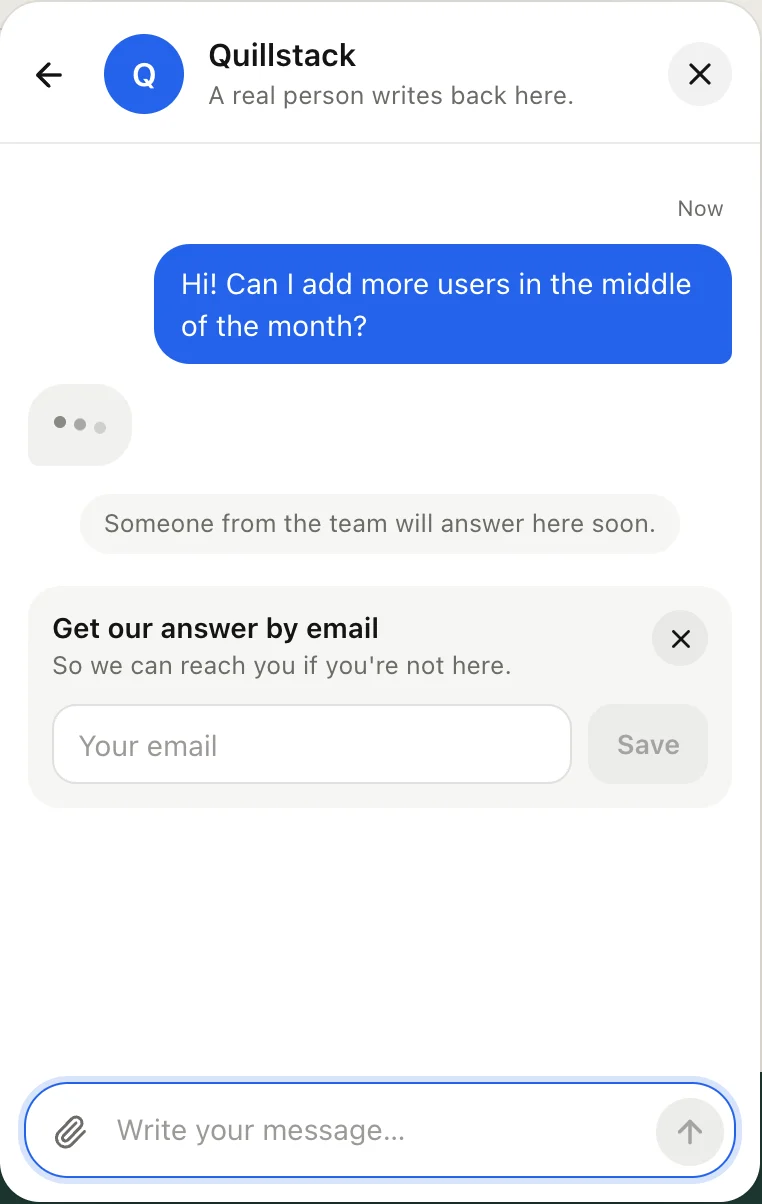
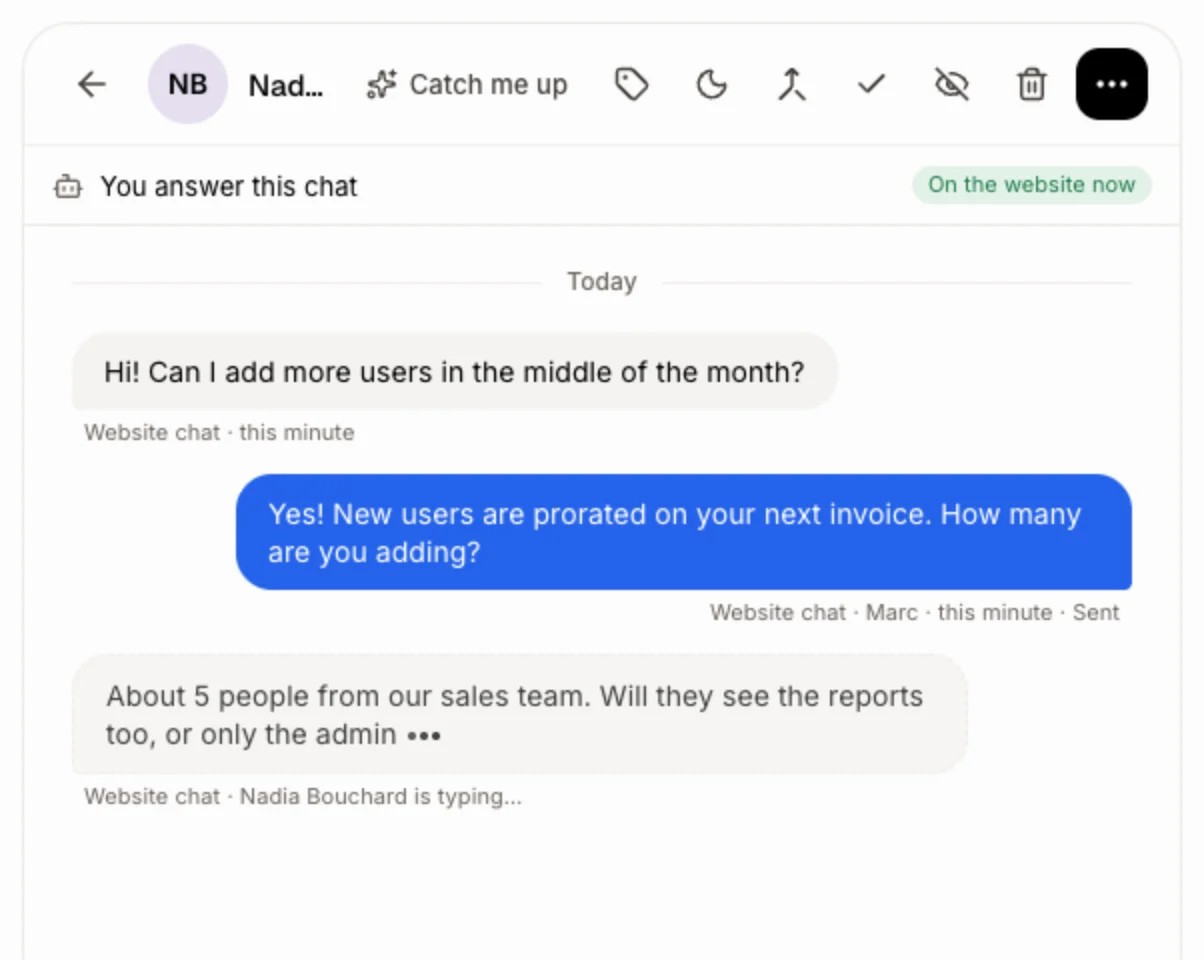
In Conversations, the visitor's words show up while they type. You read the question before it's sent, so your answer is ready the moment they hit Enter.
- Nothing to turn on: it works on every website chat.
- Your teammates' replies show up live too, so two people never answer the same chat.
- The visitor sees dots while you type back.
Know who's chatting.
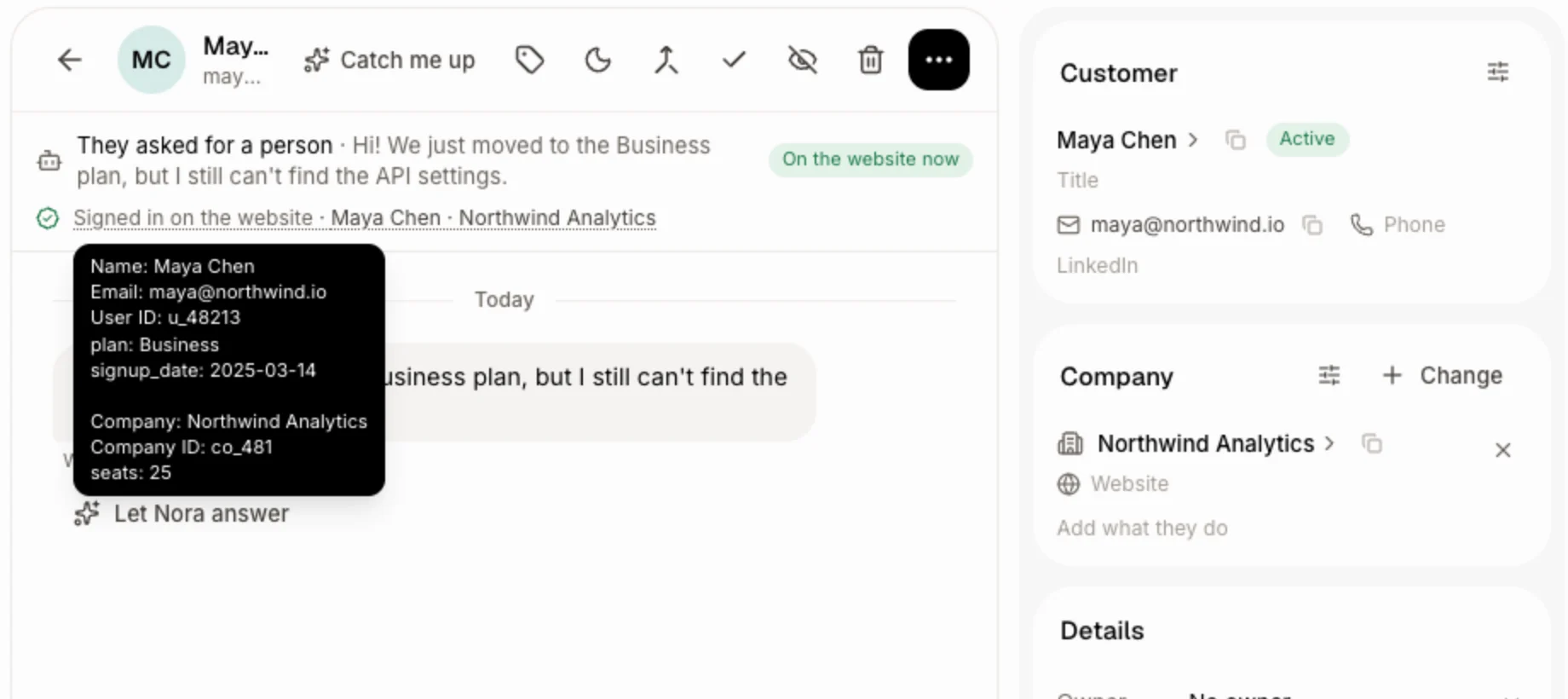
When someone signs in to your product, one Alori("identify") call tells the chat who they are: name, email, company and any field you send, like their plan or seats. It's signed with a user hash from your server.
- Your fields land on the contact or the company in your CRM.
- Nora reads their Stripe invoices or Shopify orders when you connect them.
- Connect your product's MCP server and Nora looks up their real account.
Every channel, one thread.
Website chat, support email, calls, texts, Messenger and Instagram land in one conversation per customer, with notes, saved replies and tags.
- Forward support@ and each email opens a conversation.
- Visitors rate the chat with stars.
- Front desk shows how long visitors wait for a person and what they ask about.
Change it by asking.
Your app isn’t frozen on day one. Write what you need, the way you’d text it. Alori makes the change and shows you before anything goes live.
- Turn on the chat on our website
- Add these customers: (paste your LiveChat export)
- Make Nora the backup when nobody answers in 2 minutes
- Which chats need someone right now?
The full guide
Everything above, in detail: how it works, what it replaces and what it does not.
Short answer: Alori is a LiveChat alternative for small software companies and agencies that want website chat, an AI support bot, a help center and support email without paying for each person who answers. Every plan has unlimited users, the bot runs on your plan's credits, and the chat sits in the same app as your CRM, deals, phone and invoices. Switching is one line on your site and a pasted contact list.
Why teams leave LiveChat
LiveChat is a polished chat tool with strong sales features. Small teams leave it for the bill and the split:
- LiveChat is priced per user, from $19 to $79 a month on yearly billing. Founders and engineers who jump into a chat all count.
- Essential includes 10 AI resolutions a month and Growth 200. More cost $49.50 for each pack of 50.
- The chat is in LiveChat, the deal in a CRM, the call in a phone app and the invoice elsewhere.
What you pay
LiveChat, as listed on its pricing page in November 2026:
| Team of 5 | LiveChat | Alori |
|---|---|---|
| Seats | $95 a month on Essential, $395 on Growth (yearly billing); $125 and $495 billed monthly | Unlimited users on every plan |
| AI answers | 10 or 200 included a month, then $49.50 for 50 more | Uses your plan's credits |
| Plan | Seats plus AI packs | Free to start, Solo from $99 a month, Business from $249 |
See pricing for what each Alori plan includes.
What Alori replaces
- Website chat: turn it on in Front desk and it shows on every page of your Alori website, or paste one line into any other site or web app. Visitors and your team can send photos and files.
- In Conversations, the visitor's words show up while they type, before they hit send. The visitor sees dots while you write back.
- An AI support bot: Nora answers first and hands off when she needs a person, you answer first with Nora as backup after 2 minutes, or only you with Nora suggesting answers. She learns from your help center, Company memory and price list, and every hand-off says why.
Alori("identify")tells the chat who is signed in to your product, with their company and your own fields, signed with a user hash from your server.- A help center with articles that include pictures and videos, sorted into sections, in English and French, with your own address on the Business plan.
- Forward support@ to Alori and each email opens a conversation. Tickets have steps per team and response times per priority.
- Conversations puts chat, email, calls, texts, Messenger and Instagram in one thread per customer, with internal notes, saved replies and tags.
- Visitors rate the chat with stars. Front desk shows how long visitors wait for a person and what they ask about.
- Customers, deals, calls and invoices in the same app.
What Alori doesn't do yet
Proactive chat greetings aimed at visitors on a page, a live list of everyone on your site, selling Shopify products inside the chat, a chat inside native mobile apps, and LiveChat's large app marketplace. If proactive sales chats drive your revenue, LiveChat is likely the better fit.
How to switch
- Start free. Describe your business. Alori builds your app with customers, Conversations and Front desk.
- Turn on the chat. In Front desk, turn on On your website, or copy the line under Install for another site and swap it for LiveChat's code.
- Bring your customers. Export your customer list from LiveChat, then paste it into Ask Sam with "Add these customers:". Alori adds them, with an Undo button.
- Teach Nora and forward your email. In your workspace's Chat, paste the link of each help article you want, and Alori copies it into your Help center. Then forward support@ to your Support email address in Front desk.
Questions
Another question? Ask it when you start.
Yes, for small software companies and agencies that want chat, an AI bot and a help center next to their CRM, phone and invoices, without paying per seat. For teams that sell in the chat with proactive greetings, LiveChat fits better.
Yes. Alori has unlimited users on every plan. A team of 5 pays from $99 a month on Solo, against $95 to $395 a month in LiveChat seats on yearly billing, before extra AI packs.
Alori has a free plan with no card needed. You build your app and turn on the chat for free, then buy credits or pick a plan when your bot and phone start working.
Your customers, pasted into Ask Sam from LiveChat's export, and any help article you have online, copied by link. Past chat transcripts stay in LiveChat.
Small software companies and agencies, usually under 50 people.
Related pages
See all →- Adobe Acrobat Sign alternativeQuotes clients sign, without per-license fees
- Crisp alternativeWebsite chat and AI bot inside your CRM
- Document360 alternativeA help center that updates and answers
- DocuSign alternativeQuotes and employee contracts signed online
- Dropbox Sign alternativeSigned quotes that land on the deal
- Freshdesk alternativeTickets, chat and AI bot, no per-agent bill