Team management
Coach and organise your people, in one app.
Employee files, hiring, hours, time off and Team chat with voice rooms, next to the work your team does every day.
Free plan, no card. Your Slack channels come over in one import.

One app instead of your team stack.
From a new hire to a team that runs itself.
Here is one new teammate going from their application to their first week, without leaving Alori.
- 1An applicant answers the bot's questions
- 2Their first day list starts by itself
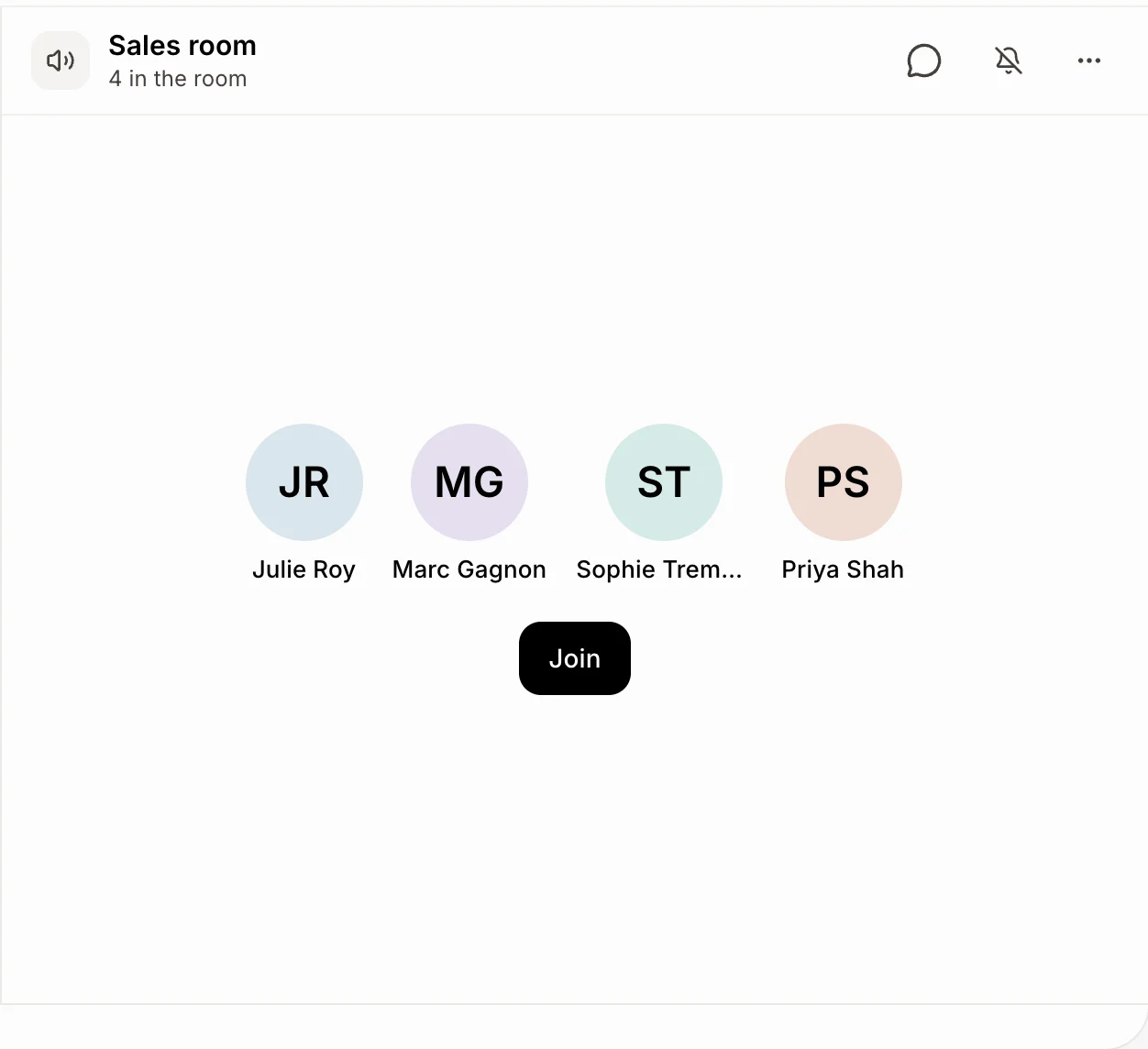
- 3The team says hello in a voice room
- 4You approve the week's hours
- 5Time off fits the team calendar
What changes on Monday.
- 01
BeforeContracts, cards and notes spread across a drive and a desk drawer
With AloriOne file per person, with documents signed in the app
- 02
BeforeHours typed from a time clock into payroll every two weeks
With AloriWeeks approved in a click, exported to CSV for your payroll
- 03
BeforeWho is off Thursday? Ask around
With AloriA team calendar of time off, birthdays and start dates
One file per person, from hire to last day.
Role, supervisor, hourly or salaried, documents to sign and file notes only HR sees. A first day list starts when someone is hired, and a last day list when they leave. Nothing is deleted.
- They sign contracts in the app with their finger.
- Cards and permits remind you before they expire.
- Workplace accidents are recorded on the file.
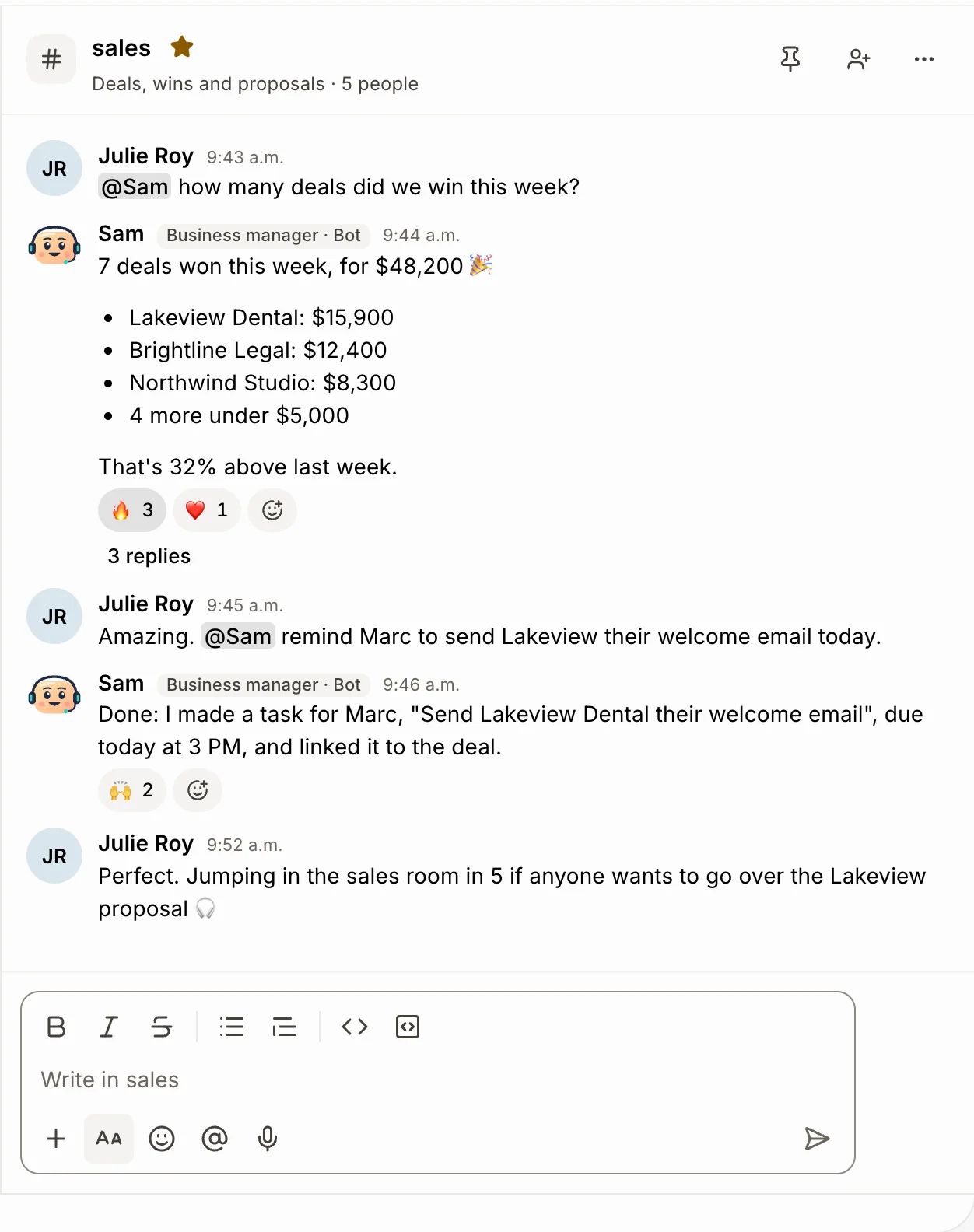
Team chat with rooms you drop into.
Channels, direct messages, threads and reactions, like Slack. Voice rooms are always open: click one and you're talking. Record the talk and it lands in Meetings with a transcript and AI notes.
- Write @Sam and the team bot gets it done.
- Invite a client to one channel as a guest.
- Your Slack channels come over in one import.
Hours that go straight to payroll.
People clock in from their phone, or their clocks start and stop with a job. Approve each person's week, then export one line per person with regular hours and overtime. Alori doesn't pay people: your payroll provider does.
- Overtime past 40 hours a week.
- Fix a line or add forgotten hours.
- Ask Sam how much overtime Marc did.
Add up your tools. See what you save.
Add the tools you pay for. We count their public prices for your team, take off your Alori plan and show what you save.
Today
Communication

Slack
Team chat with voice rooms you drop into
Pro plan, 5 users
$435 a year
Work delivery

BambooHR
Employee files, time off, hiring and hours
Core plan
$3,000 a yearClockify
Timers, rates and hours billed in one click
Standard plan, 5 users
$329 a year
Office time
Calls, emails and paperwork Alori's bots take on
Potential savings
$6,756 a year
69% of what you spend today.
- Communication$435Slack
- Work delivery$3,329BambooHR, Clockify
- Office time$5,9805 h a week at $23 an hour, estimated
- Alori Business plan−$2,988
Estimated from public list prices checked in November 2026, billed yearly when that's cheaper. Your results will vary. Calls, texts, video and AI work use your plan's monthly credits. What Alori replaces, tool by tool
Change it by asking.
Your app isn’t frozen on day one. Write what you need, the way you’d text it. Alori makes the change and shows you before anything goes live.
- Who is off next week?
- How much overtime did Marc do last week?
- Approve everyone's hours for this week
- Whose cards expire this month?
The full guide
Everything above, in detail: how it works, what it replaces and what it does not.
Short answer: Alori keeps your team in the same app as your work. Each person has a file with their role, their supervisor, their documents and notes only managers see. Hiring, onboarding and the day someone leaves each get a list that starts by itself. People clock in and out, you approve their week, and Alori exports the hours for your payroll provider. Time off is asked and answered in the app, next to a team calendar. And Team chat, with channels and voice rooms, replaces Slack. Every plan has unlimited users. Alori does not run payroll: it approves the hours, and your payroll provider pays your people.
The problem: your team lives in six tools
A small team is usually managed with a stack of separate apps:
- An HR tool like BambooHR for files, documents and onboarding.
- A time clock like Homebase, When I Work or Clockify for hours and timesheets.
- A time-off tracker, or a shared spreadsheet of who is off when.
- A chat app like Slack or Discord, plus Zoom for calls.
- A payroll provider like Gusto, fed by hand from the time clock.
- Paper or a drive folder for contracts, cards and accident reports.
Each tool charges per person and keeps its own list of your team. Alori keeps one list, and everyone gets a login.
What Alori does for your team
| What you need | What Alori does | What it replaces |
|---|---|---|
| Keep each person's file | Role, department, supervisor, hourly or salaried, documents to sign, and file notes only HR sees. An org chart of who reports to whom | BambooHR |
| Hire | Openings on your website's career page. A bot texts each applicant your questions and gives a fit from 1 to 5 | Job boards and applicant spreadsheets |
| Start and end well | A first day list that starts by itself (contract, tax forms, app invite, equipment), and a last day list when someone leaves | Onboarding checklists |
| Track hours | People clock in and out, or their clocks start and stop with a job. You approve each week under Timesheets | Homebase, When I Work, Clockify |
| Feed payroll | Export to CSV: one line per person per week, with regular hours and overtime | Typing hours into Gusto |
| Handle time off | Requests from their phone, answered in the app, with balances and a team calendar of who is off, birthdays and start dates | Time-off trackers |
| Talk | Team chat with channels, direct messages, threads and voice rooms you drop into | Slack, Discord, Zoom |
| Stay safe | Cards and permits with expiry reminders, and workplace accident reports | Paper files |
How it works
- Add your team. Click Add an employee for each person, or let Alori start a file when you hire someone. Invite them by email so they get their own login.
- Welcome them. Their first day list starts on its own. Upload a contract and click Ask to sign: they sign in the app with their finger.
- Track the hours. They clock in from their phone, or Alori clocks the crew in when a job starts. Approve each person's week under Timesheets.
- Send hours to payroll. Click Export to CSV and enter the hours with your payroll provider.
- Answer time off. Requests wait under To answer. You see who else is off, and they hear back in the app and by email.
- Talk as a team. Write in a channel, @mention Sam, your team bot, to get something done, or click a voice room to talk.
- When someone leaves. End their employment: their file stays, nothing is deleted, and their last day list starts.
Coach with what really happened
Alori gives each person a scorecard from the work itself over the last 90 days: jobs done, hours and on-time rate. For a sales team, Leo, your AI sales coach, reviews recorded calls and shows each rep's score, talk ratio and weakest skill, with the trend from the period before. File notes keep the follow-ups from your one-on-ones, and only HR sees them.
Team chat with voice rooms
Team chat has everything you used Slack for: public and private channels, direct messages, threads, reactions, reminders and scheduled messages. Voice rooms are always open: click one and you're talking, camera on or off. Ring a teammate in, share your screen, and record the talk to get a transcript and AI notes in Meetings. Invite a client or a contractor to one channel as a guest; they never see your CRM. Moving from Slack? Your channels and their people come over in one import.
What Alori doesn't do yet
- No payroll. Alori approves hours and exports them, but it does not pay employees, file payroll taxes or make tax slips. Keep Gusto, or your payroll provider, for that.
- No benefits administration, performance review cycles or employee surveys.
- No kiosk, GPS check-in or shift trading. People clock in from the app on a computer or phone.
- Slack's direct messages don't come over in the import.
Who it is for
Agencies, software companies and service businesses with a team of a few people up to a few dozen, who would rather keep their people, their hours and their chat in the app where the work happens. See Agencies, Tech and SaaS and Employees.
Questions
Another question? Ask it when you start.
No. Alori tracks and approves hours and exports a pay summary with regular hours and overtime per person per week. Your payroll provider, Gusto included, pays your people and files the taxes.
No. Only people whose role allows it see pay. Each employee sees their own clock, hours, time off and documents in My space.
For most small teams, yes: channels, direct messages, threads and voice rooms, with your team bot in the chat. Your Slack channels come over in one import.
Alori is free to start, no card needed. Solo starts at $99 a month and Business at $249, with unlimited users on every plan, so you never pay per employee. See pricing.
Yes. Ask Sam "who is off next week?" or "how much overtime did Marc do?" and get the answer.
Related pages
See all →- Get foundYour website, campaigns, posts, reviews and leads in one place
- SellFrom the first call to the signed quote and the upsell
- Support customersChat, email, texts, calls and tickets in one place
- Deliver the workDeliver what you sold, on time
- Get paidBill the work and get paid on time
- See how the business is doingMoney, sales, calls, tickets and hours, plus answers on demand