
tl;dv alternative
Your calls, recorded with no bot, filed on the right customer.
Alori Recorder for Mac records Zoom, Meet and Teams by itself. The transcript, summary and next steps land on the customer, beside their deals and quotes.
Free plan, no card. Import the meetings you want to keep as files.
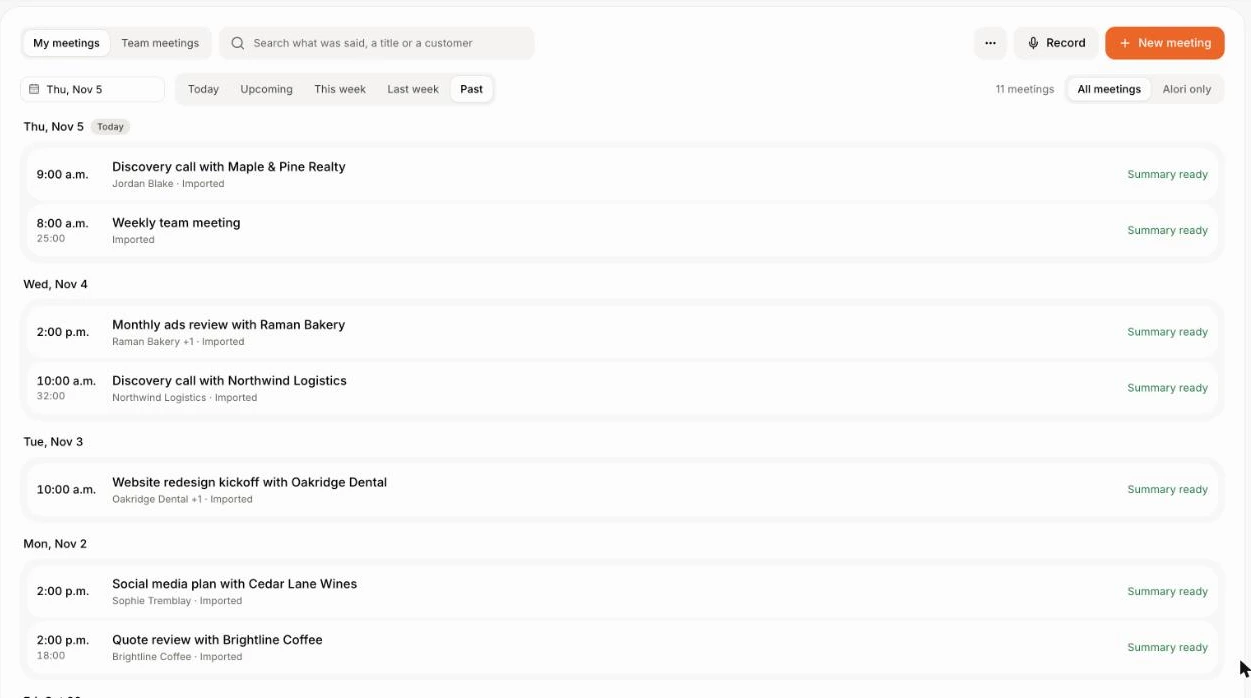
tl;dv and Alori, side by side.
tl;dvAloriFrom a Zoom call to a task with an owner.
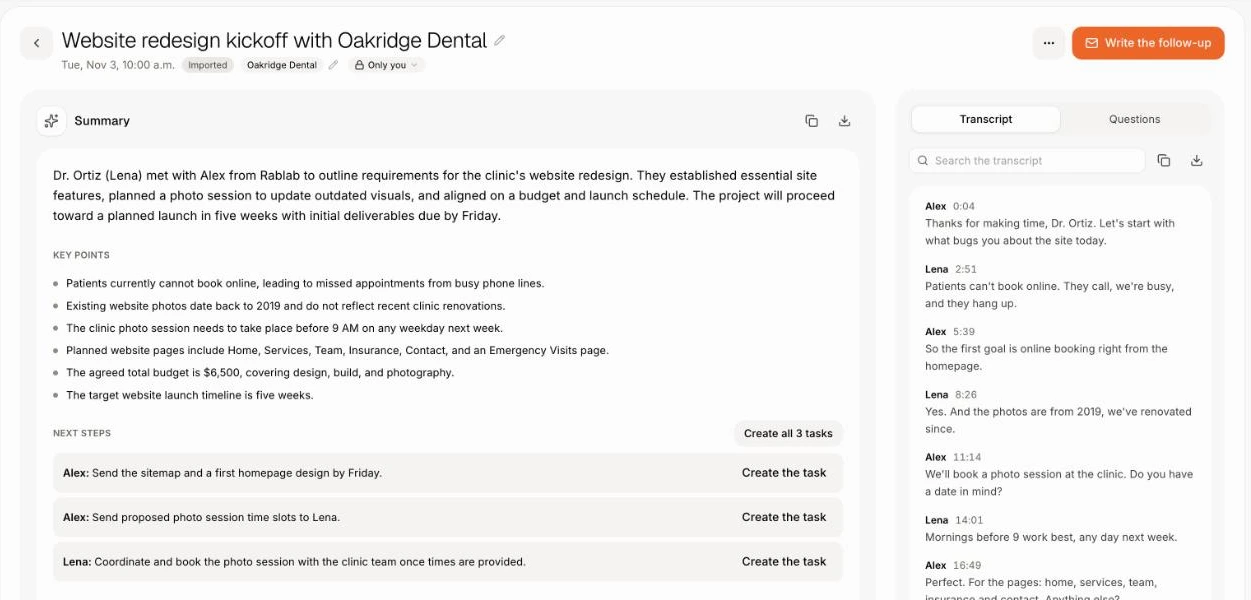
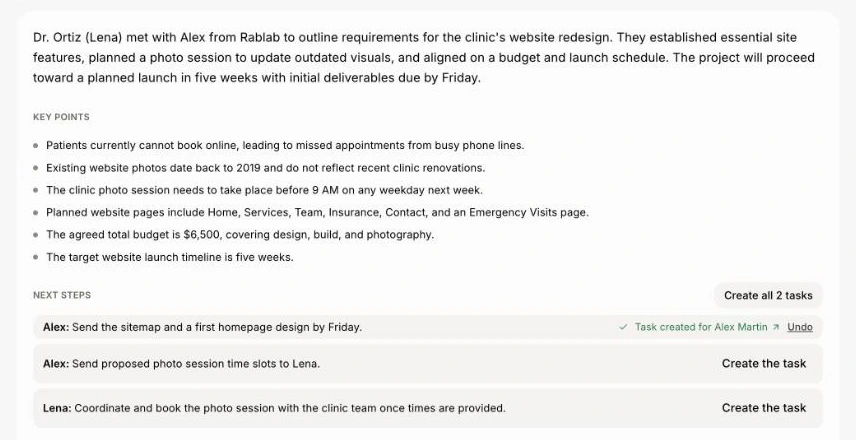
Join your call as usual. The recorder starts by itself, and the notes land on the customer when you hang up.
- 1The recorder starts with the call
- 2The notes land on the customer
- 3Each next step becomes a task
What changes on Monday.
- 01
BeforeNotes written in one app, copied or synced into the CRM
With AloriNotes land on the customer, next to deals and quotes
- 02
BeforeA notetaker bot joins and customers ask who it is
With AloriAlori Recorder records from your Mac, with nothing joining
- 03
BeforeCustomers who phone in leave no notes
With AloriCalls on your business number are recorded and summarized too
Records the calls you already have.
The Zoom and Teams apps, and Meet, Zoom, Teams, Webex and Whereby in any browser. FaceTime and Slack huddles too. It starts when a call takes your microphone and stops when you hang up.
- Don't record this one keeps a meeting off the record.
- Unsure a call started? It asks Record this call? first.
- It comes with Alori at no extra cost; notes use credits.
Ask across every call.
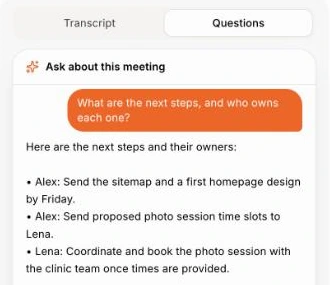
Ask about one meeting, or ask Sam across all your past calls and meetings. Alori answers from what was said.
- "What are the next steps?"
- "Write a follow-up email."
- "Which customers asked about SSO this quarter?"
Change it by asking.
Your app isn’t frozen on day one. Write what you need, the way you’d text it. Alori makes the change and shows you before anything goes live.
- What did Orbit Labs say about onboarding?
- Make a task for every next step from today's calls
- Write the follow-up email for my last meeting
- Which customers asked about SSO this quarter?
The full guide
Everything above, in detail: how it works, what it replaces and what it does not.
Short answer: Alori is a tl;dv alternative for small software companies and agencies that want each Zoom, Meet or Teams call recorded and its notes filed on the right customer and deal, in the same app as their CRM, phones and quotes. Alori Recorder for Mac records from your computer with no bot, and Leo, the AI sales assistant, coaches reps from the calls. There is no tl;dv import, so you bring the meetings that matter as files and record the next ones in Alori.
Why teams leave tl;dv
tl;dv is a well-made AI notetaker with a free plan, many languages and syncs to HubSpot, Salesforce and Pipedrive. Teams leave it for three reasons:
- tl;dv writes the notes, then syncs them into a CRM you pay for separately.
- tl;dv usually joins as a bot; its desktop app records without one.
- Customers who call your business number never reach a video notetaker.
What you pay
tl;dv, as listed on its pricing page in November 2026, in euros per seat:
| Team of 5 | tl;dv | Alori |
|---|---|---|
| Notes | Pro: €90 a month billed yearly (€18 a seat), €145 monthly | Solo from $99 a month, everyone included |
| More features | Business: €145 a month billed yearly (€29 a seat), €195 monthly | Business from $249 a month |
| CRM and phones | A separate CRM | Built in |
| Free plan | Yes | Yes, no card |
Recording and notes in Alori use your plan's credits. See pricing.
What Alori replaces
- Alori Recorder for Mac records the Zoom and Teams apps, and Meet, Zoom, Teams, Webex and Whereby in any browser, plus FaceTime and Slack huddles. It starts by itself when a call takes your microphone and follows you when you share your screen.
- A transcript with who said what, a summary and next steps land in Meetings, linked to the customer. Click Create the task beside a next step.
- Alori video meetings: send a link, and guests join in their browser with no account and see that the meeting is recorded.
- Calls on your business number get a recording, a transcript and a summary too. See calls.
- Ask about one meeting, or ask Sam "What did Orbit Labs say about onboarding?" across every past call.
- Leo scores each recorded sales call out of 10 with better words to say, and sends each rep their week.
- Customers, deals, quotes and invoices in the same app.
What Alori doesn't do yet
- The recorder is Mac only (macOS 15 or later). On Windows, import the recording after the call.
- No shareable video clips or highlight reels.
- tl;dv says it transcribes more than 100 languages; Alori's app is in English and French.
- No sync to an outside CRM: the notes stay in Alori's own CRM.
If you only want free meeting notes and already live in another CRM, tl;dv may be the simpler choice.
How to switch
- Start free. Describe your business. Alori builds your app with customers, deals and Meetings.
- Bring your customers. Import data brings them from HubSpot, Pipedrive, Zoho CRM or GoHighLevel, or paste a list into Ask Sam: "Add these customers:".
- Bring the meetings that matter. Download the recordings or transcripts you want to keep from tl;dv and import each in Meetings › Import (.mp4, .m4a, .vtt, .srt, .txt or .docx, up to 4 hours).
- Install Alori Recorder for Mac. Your next call records by itself, with no bot.
Questions
Another question? Ask it when you start.
Yes, if you want calls recorded with no bot and the notes on the customer, next to their deals and quotes. If you need a notetaker on Windows or in many languages, tl;dv fits better.
For a team that also pays for a CRM, yes: Alori's Solo plan is $99 a month for everyone, with the CRM, phones and notes included. Both have a free plan.
There is no tl;dv import. Import the recordings or transcripts you saved one at a time in Meetings, and Alori writes the summary and next steps. Alori imports whole libraries from Fathom, Granola and Claap.
No. Alori Recorder records from your own Mac, with nothing joining the meeting.
Small software companies and agencies, usually under 50 people. See meeting notes to tasks.
Related pages
See all →- Acuity alternativeBooking links, reminders and team scheduling
- Aircall alternativeA business phone that knows the customer
- Avoma alternativeNotes, coaching and booking inside your CRM
- Cal.com alternativeBooking links next to your CRM and deals
- Calendly alternativeBooking links, online booking and reminders
- Chorus alternativeCall coaching and notes inside your CRM