
Chorus alternative
Every sales call coached, right next to the deal.
Calls and meetings recorded with a transcript and a summary, and Leo coaching each rep from them, in the same app as your CRM and phones.
Free plan, no card. Import the recordings you want to keep, and record the next call in Alori.
Chorus and Alori, side by side.
ChorusAloriFrom a recorded call to a better next call.
The call is recorded, Leo reviews it on his own, and the rep sees the moment to fix with better words.
- 1The call is recorded and transcribed
- 2Leo writes to the rep
- 3The manager sees the team
What changes on Monday.
- 01
BeforeA quote from ZoomInfo before you know the cost
With AloriPublic plans, unlimited users on every one
- 02
BeforeRecordings in Chorus, deals in the CRM, calls in a phone app
With AloriCalls, meetings and coaching on the same customer and deal
- 03
BeforeManagers pick a few calls to listen to each week
With AloriLeo reviews every recorded sales call and sends each rep their week
Recorded wherever the call happens.
Calls on your business number, meetings held in Alori, and Zoom, Teams or Meet calls recorded on your Mac with no bot. Each one gets a transcript, a summary and next steps on the customer.
- The recorder starts by itself when a call takes your microphone.
- Managers listen in to live calls from the Live tab.
- Import a recording or transcript from anywhere, up to 4 hours.
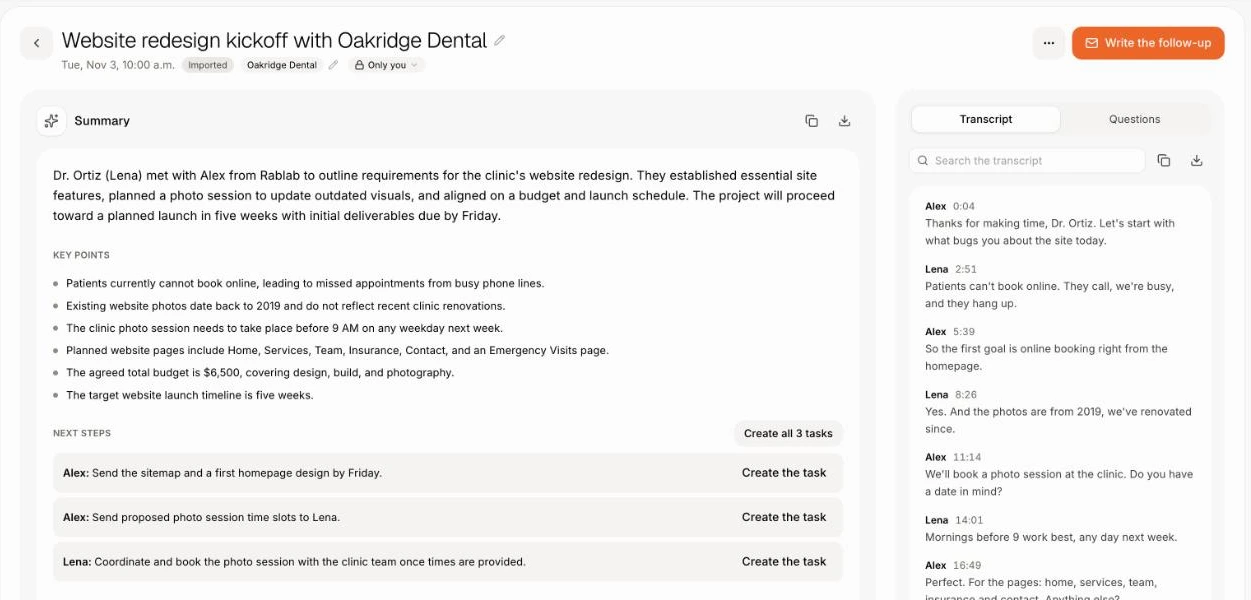
Coaching with proof.
Every point Leo makes links to the call it came from, with the exact words said and the words to say instead, so a manager checks it in one click.
- Tell him your method: MEDDPICC, BANT, SPIN, Sandler, Challenger or your own.
- Each Friday, reps get their week and one skill to work on.
- Reps practice by having Leo play a tough buyer.
Change it by asking.
Your app isn’t frozen on day one. Write what you need, the way you’d text it. Alori makes the change and shows you before anything goes live.
- How did the team do on discovery calls this month?
- What did Lumen say about price?
- Make a task for every next step from yesterday's calls
- Play a buyer who says we're too expensive
The full guide
Everything above, in detail: how it works, what it replaces and what it does not.
Short answer: Alori is a Chorus by ZoomInfo alternative for small software companies and agencies that want each sales call recorded, reviewed and turned into next steps, without a separate conversation intelligence contract. Calls on your business line, meetings held in Alori and Zoom, Teams or Meet calls recorded on your Mac land on the customer, and Leo, the AI sales assistant, coaches each rep from them. It's one app with your CRM, with unlimited users and public prices.
Why teams leave Chorus
Chorus is ZoomInfo's conversation intelligence product, strong at deal and market insights for sales teams. Small teams leave it for three reasons:
- ZoomInfo lists no price for Chorus; you request a demo and a quote.
- It adds a tool to the stack: the recordings live in Chorus, the deal in your CRM and the phone in a third tool, joined by syncs.
- It is built for bigger revenue teams. Market intelligence across thousands of calls pays off at that scale, while a team of five mostly needs the notes, the next step and a coach.
What you pay
Chorus, as shown on its product page in November 2026: no price listed, demo on request.
| Team of 5 | Chorus | Alori |
|---|---|---|
| Price | Priced on request | Free to start, Solo from $99 a month, Business from $249 |
| Users | Quoted per contract | Unlimited users on every plan |
| CRM and phones | Separate tools | Built in |
Recording notes and Leo's reviews use your plan's credits. See pricing.
What Alori replaces
- With Record calls on, calls on your business number come with a recording, a transcript and a summary on the customer. Managers listen in from the Live tab. See calls.
- Hold the meeting in Alori, or let Alori Recorder for Mac record the Zoom, Teams or Meet call with no bot. You get a transcript, a summary and next steps, and a next step becomes a task in one click. See meetings.
- Leo reviews every recorded sales call and sales email: a score out of 10, what went well, what to fix with the words said and better ones, the next step and the risks. Every point links to the moment it came from.
- Ask how the team is doing and Leo answers with each rep's calls reviewed, average score, talk ratio, questions per call and next steps set. Managers get a Monday recap; reps get their week every Friday.
- Leo ranks open deals hot, warm or cold with the reasons and the risks, and a deal brief shows every email, call and meeting on it. See deals.
- Ask about one meeting, or ask Sam across past calls: "What did Lumen say about price?"
What Alori doesn't do yet
- Market and competitor insights across every call, and win-loss analytics.
- ZoomInfo's contact data. Alori finds people through your own Apollo account instead.
- Forecasting, and live guidance during calls. Leo reviews each call after it ends.
- The recorder is Mac only (macOS 15 or later). On Windows, import the recording after the call.
If your revenue team relies on Chorus's market intelligence and ZoomInfo data, stay on Chorus.
How to switch
- Start free. Describe your business. Alori builds your app with customers, deals, Calls and Meetings.
- Bring your contacts and deals. Import data brings them from HubSpot, Pipedrive, Zoho CRM or GoHighLevel. From another CRM, paste a CSV into Ask Sam: "Add these customers:".
- Bring the calls you want to keep. There is no Chorus import: download the recordings or transcripts that matter and import each in Meetings › Import (.mp4, .m4a, .vtt, .srt, .txt or .docx, up to 4 hours). Alori writes the summary and next steps.
- Record the next call in Alori and turn Leo on. Install the recorder, or turn on Record calls on your business number, and his reviews start on their own.
Questions
Another question? Ask it when you start.
Yes, for a small team that wants every sales call recorded, summarized and coached next to the deal. For a large team that relies on market intelligence across thousands of calls, Chorus fits better.
Alori is free to start, and Solo from $99 a month covers your whole team, with recording and coaching using your plan's credits. Chorus gives prices on request.
There is no Chorus import. Recordings and transcripts you download come over one at a time through Meetings › Import, and Alori writes each one's summary and next steps.
No. Alori Recorder records the call from your own Mac, with nothing joining the meeting.
Small software companies and agencies, usually under 50 people. See sales coaching and the Gong alternative.
Related pages
See all →- Acuity alternativeBooking links, reminders and team scheduling
- Aircall alternativeA business phone that knows the customer
- Avoma alternativeNotes, coaching and booking inside your CRM
- Cal.com alternativeBooking links next to your CRM and deals
- Calendly alternativeBooking links, online booking and reminders
- Claap alternativeRecorded calls filed on the customer and the deal