
Granola alternative · Botless, with the video
No bot, the whole call, on the right customer.
Alori is the all-in-one app for your business: customers, schedule, quotes, invoices and meetings. Like Granola, its Mac recorder sends no bot into your call. Unlike a notepad, it keeps the video and puts the notes and next steps on the customer.
Free plan, no card. Alori Recorder for Mac comes with it, and your Granola meetings come over with an API key.
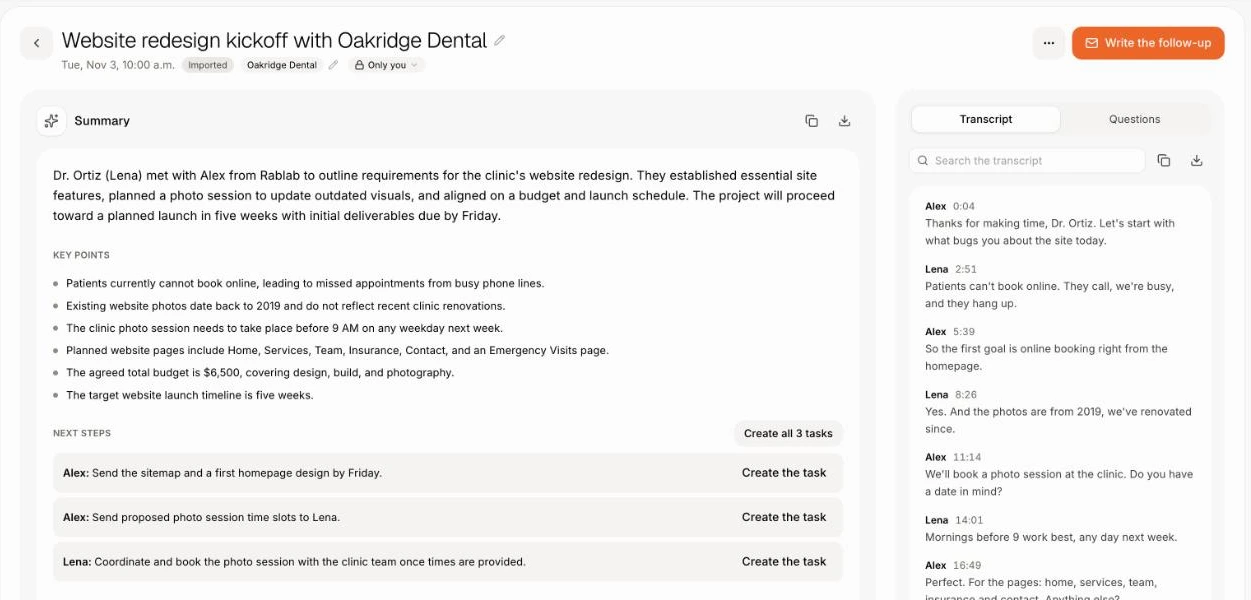
Granola and Alori, side by side.
GranolaAloriJoin the call. Hang up. The work is on the customer.
Alori Recorder starts by itself, keeps the whole call, and Alori writes the notes on the right customer with the next steps ready to become tasks.
- 1Your next call, with Join, in the menu bar
- 2It records the call and the screen you share
- 3The notes land on the customer
- 4Click Create the task beside each step
What changes on Monday.
- 01
Before"It's the unit on the left" and no video to look back at
With AloriThe video and your shared screen stay with the notes
- 02
BeforeNotes in a notepad, the quote and the invoice somewhere else
With AloriEverything on the customer, in one app
- 03
BeforeCustomers call the business number, and the notepad never hears it
With AloriCalls on your business number are recorded and summarized too
- 04
BeforeNext steps in a paragraph, with nobody's name on them
With AloriEach next step becomes a task in one click
Botless, and you keep the call.
Alori Recorder for Mac records the call's window with your voice and everyone else's. When you share your screen, it follows you there. The video stays in Meetings, next to the transcript.
- Nothing joins the call.
- Rewatch the moment a customer pointed at something.
- Works in the Zoom and Teams apps and in any browser.
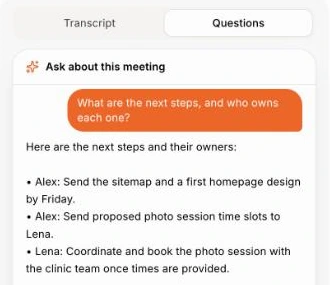
Ask anything about the call.
Under Questions, ask what was decided, what's next or for a follow-up email. Alori answers from the call itself.
- What are the next steps?
- What did we decide?
- Write a follow-up email.
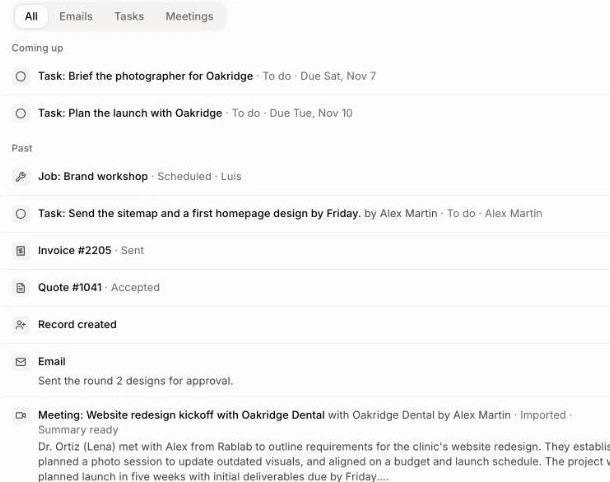
Everything on the customer.
The meeting sits in the customer's activity, next to their jobs, quotes, calls and tasks. Open the customer and the whole story is there.
- Calls on your Alori business number get notes too.
- Ask Sam across all your past calls.
- Catch me up summarizes the customer in a click.
Your day of calls, one look away.
Open Alori Recorder from the Dock or put its widget on your desktop: the next call with a Join button, what's coming up, and your last recordings with their notes.
- A countdown to your next meeting in the menu bar.
- Join Google Meet, Zoom or Teams in one click.
- Notes ready, with how many next steps.
Change it by asking.
Your app isn’t frozen on day one. Write what you need, the way you’d text it. Alori makes the change and shows you before anything goes live.
- Turn the next steps from today's call into tasks
- Write the follow-up email from the Riverside Dental call
- What did Riverside Dental ask for in our last three calls?
- Import my Granola meetings
The full guide
Everything above, in detail: how it works, what it replaces and what it does not.
Short answer: Granola is a well-loved AI notepad: no bot joins your call, it listens to your device's audio, and it turns the notes you type into clean meeting notes. Alori Recorder for Mac is botless too, but it does more with the call. It starts by itself when a call starts, keeps the video with the screen you share and both sides of the sound, and files the transcript, summary and next steps on the customer, beside their deals, quotes, jobs and invoices, in the app you run your business with.
Who Granola fits well
Granola suits people who like to type their own notes during a meeting and want an AI to fill in the rest. It works on desktop and phone, and its notes are easy to share and chat with. Teams that keep their customers in another CRM can connect it on paid plans.
As of November 2026, Granola's pricing page lists Basic at $0 with 30 days of meeting history, Business at $14 per user per month, and Enterprise at $35 per user per month. Its pricing page says the audio is deleted after transcription.
Why owners look for a Granola alternative
- There is no recording to go back to. Granola keeps the words, not the call. When a customer says "it's the unit on the left", you can't rewatch the screen they shared.
- The notes live in a notepad, not with the customer. Someone still copies the summary into the customer file, and the quote, the job and the invoice live somewhere else.
- Calls happen on the phone too. Customers call the business number. A desktop notepad never hears those calls.
- Next steps need owners. "Send the revised quote Friday" has to become a task with a name and a date.
- One more subscription, per person, as the team grows.
Granola vs Alori, side by side
| Granola | Alori | |
|---|---|---|
| A bot in your call | No, it listens to your device's audio | No, Alori Recorder records from your Mac |
| What it keeps | The transcript and notes; the audio is deleted | The video of the call, your shared screen, the sound, the transcript and the notes |
| Notes you type during the call | Yes, a core strength | No: Alori writes the notes from the whole call |
| Where notes live | In Granola, or sent to a CRM on paid plans | On the customer, next to their deals, quotes, jobs and invoices |
| Next steps | In the notes | Each next step becomes a task in one click |
| Phone calls | Not covered | Calls on your Alori business number, recorded and summarized |
| Your Granola history | Stays in Granola | Imported with an API key, transcripts included |
| Windows and phone | Desktop and phone apps | Mac only for now: on Windows or a phone, import the recording afterwards |
How Alori Recorder for Mac works
- Add it to your Alori app. Alori Recorder for Mac comes with Alori. Once your app is built, install the recorder and click Connect to link it to your account. Allow the microphone and screen recording.
- Join your call as usual. In the Zoom or Teams app, or Meet, Zoom, Teams, Webex or Whereby in any browser. It starts recording by itself: the call's window, your voice and everyone else's. Nothing joins the call.
- Share your screen when you need to. It records the screen you present from, then goes back to the call.
- Hang up. The call lands in Meetings, on the customer when it matches a booking or a calendar event. A few minutes later, the transcript, summary and next steps are there, and you can rewatch any moment.
The menu bar counts down to your next meeting with a Join button. The home window and a desktop widget show what's coming up and your last recordings with Notes ready. Don't record this one keeps a meeting off the record.
See how to record your calls with Alori Recorder for Mac.
What else Alori does with your meetings
- Turns next steps into work. Click Create the task beside a step. The person who made the meeting gets the summary by email.
- Answers questions. Under Ask about this meeting, ask "Write a follow-up email". Ask Sam answers across all your past calls and the rest of the customer's file.
- Runs its own video meetings. Send a link from the Schedule; guests join in the browser, no account. See the Meetings app.
- Covers phone calls. With Record calls on, calls on your business number come with a recording, transcript and summary. See calls.
- Imports what you recorded elsewhere. Upload a recording or a transcript, up to 4 hours long.
What Alori does not do:
- There's no notepad to type in during the call: Alori writes the notes from the whole conversation.
- The recorder is a Mac app (macOS 15 or later). There's no Windows or phone recorder yet.
- If you only want a personal notepad and don't need the video or a CRM, Granola is a fine fit.
How to switch
- Build your app. Describe your business. Alori sets up customers, the schedule and Meetings.
- Bring your Granola meetings. Paste a Granola API key (Business and Enterprise plans) in Import data: every meeting comes over on its date, with its guests and transcript, on the customer whose email was a guest. Alori writes its own summary and next steps for each.
- Install Alori Recorder for Mac. Your next call records by itself, with the video.
- Cancel Granola once your calls land in Alori.
Questions
Another question? Ask it when you start.
Yes, if you want botless recording that keeps the video, with notes on the customer and next steps as tasks, in the same app as your schedule, quotes and invoices. If you mostly want to type your own notes on Windows or a phone, Granola is the better fit.
Yes. Alori Recorder for Mac records from your Mac: nothing joins the meeting and the other people see no extra guest.
Yes. The video of the call, with the screen you shared, stays in Meetings next to the transcript and the notes, so you can rewatch any moment.
Yes. Paste a Granola API key in Import data. Each meeting comes into Meetings with its guests and transcript. Granola's own summary isn't copied; Alori writes its own.
The recorder comes with Alori at no extra cost. Recording and notes use credits from your Alori balance. See pricing. There is a free plan, no card needed.
Related pages
See all →- Acuity alternativeBooking links, reminders and team scheduling
- Aircall alternativeA business phone that knows the customer
- Calendly alternativeBooking links, online booking and reminders
- Claap alternativeRecorded calls filed on the customer and the deal
- Discord alternativeChannels, categories and voice rooms for a team
- Fathom alternativeRecords your calls with no bot, notes on the customer