Hand off the busywork. It gets done without you.
Automations that follow up on their own, and an AI team that texts, calls and answers for you, on your real customers, deals and invoices.
Free plan, no card. Your HubSpot workflows come over as automations, turned off.
InputKit's Zapier bill is down to a third.
InputKit sells software to 2,000 service businesses. Zapier and in-house scripts used to keep a dozen apps in sync. Now its bots and automations run in Alori, next to its CRM, phones and support, and only a few zaps are left.
Read InputKit's story →One app instead of your automation stack.
From one sentence to work that keeps running.
Here is one automation, from the request in plain words to the follow-up it does every week, without anyone pressing a button.
- 1Say what should keep happening
- 2It's on, with a switch and Test it
- 3Something happens in the app
- 4The bots handle the rest
- 5Every bot stays under its limit
What changes on Monday.
- 01
BeforeA zap breaks and nobody notices for a week
With AloriAn automation pauses after 5 failures and tells whoever set it up
- 02
BeforeFollow-ups that depend on someone remembering
With AloriAutomations and bots follow up the moment something happens
- 03
BeforeCalls and chats at night go to voicemail
With AloriNora answers, and hands the tricky ones to your team
Say it in plain words. It's on.
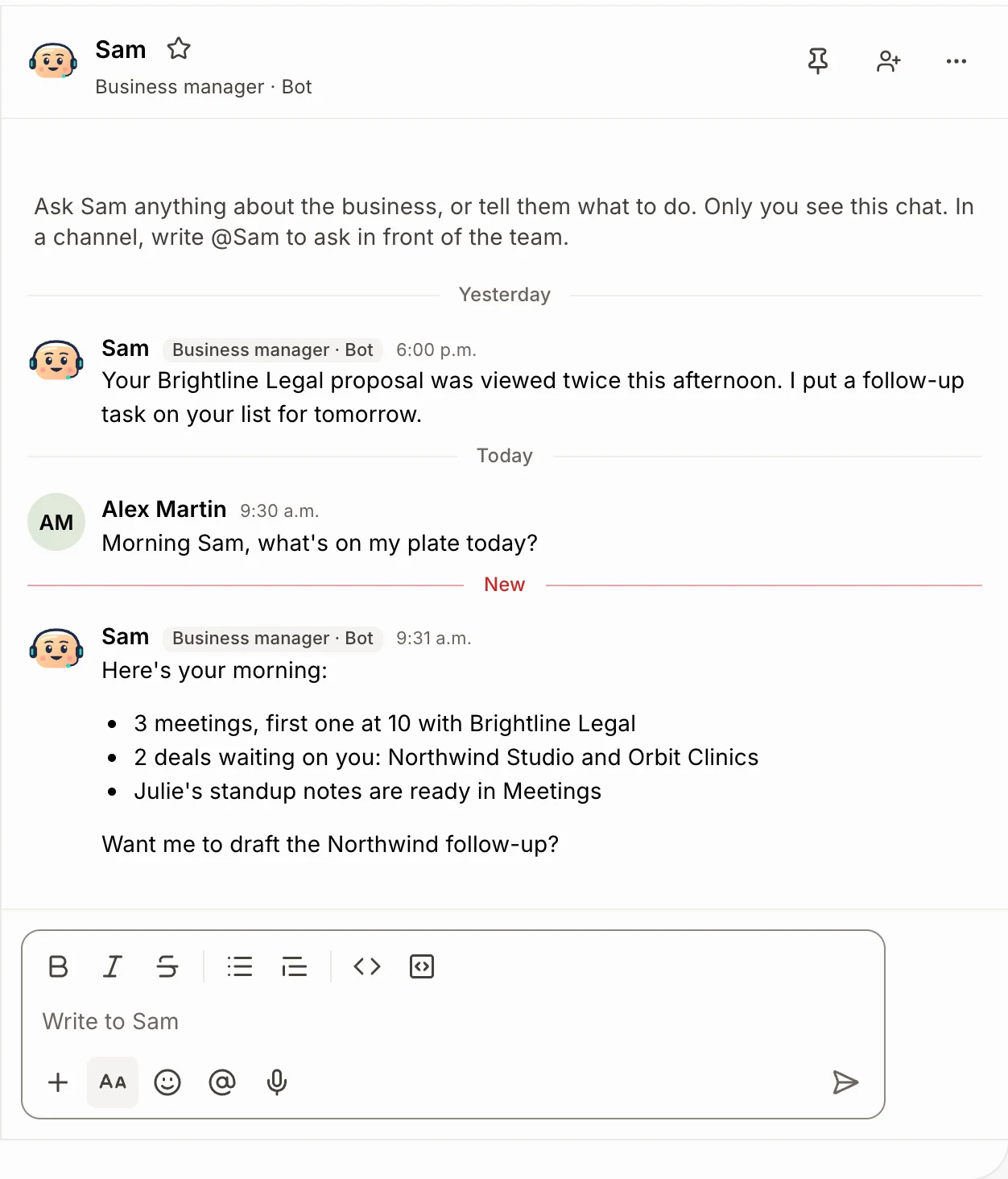
Tell Sam what to keep doing, like you'd tell an assistant. He sets up the automation, turns it on and shows you a card with a switch and Test it.
- Starts when a record is added or changes, on a schedule, or when a meeting ends.
- Texts, emails, calls, Slack and Team chat posts, tasks, notes and webhooks.
- An AI step handles what plain steps can't.
An AI team, each with one job.
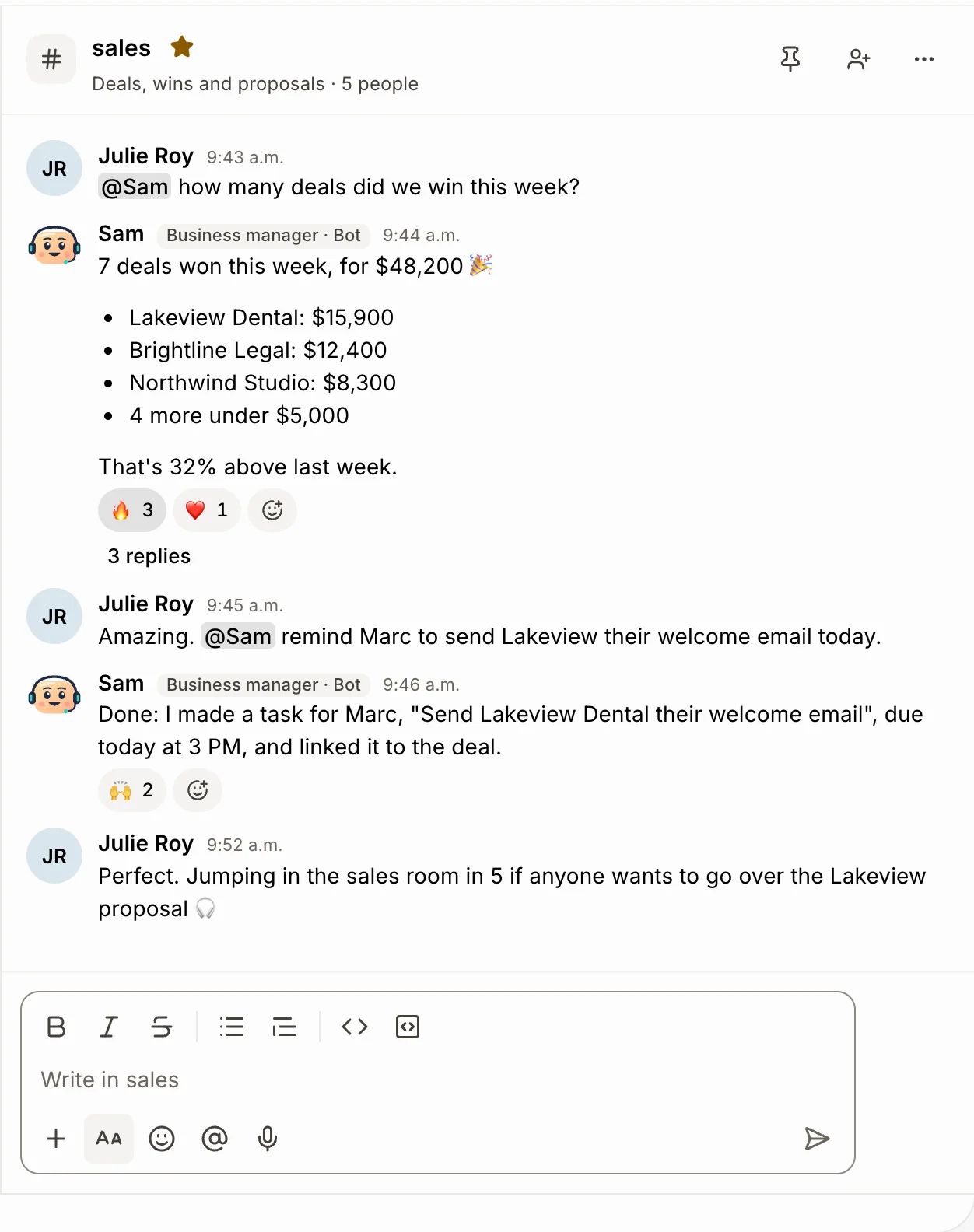
Sam runs the office, Nora answers customers, Leo backs up your sellers and Mila clears each person's to-dos. They work on your real records, and anything that reaches a customer waits for your yes.
- Text or call Sam from your mobile, or @Sam him in Slack.
- Nora answers website chats, support emails and, if you want, calls.
- Iris keeps your help center current, with fresh screenshots.
A limit on every bot.
Each bot has a hard limit on the credits it may spend in a week or a month, everything counted: replies, automations, calls and its computer. It stops at the limit, and the owner gets a text.
- Each bot's header shows what it spent against its limit.
- A new bot gets a sensible limit as it starts spending.
- Admins change it in one tap.
Add up your tools. See what you save.
Add the tools you pay for. We count their public prices for your team, take off your Alori plan and show what you save.
Today
Client experience
Intercom
Chat, AI bot and help center, no per-seat bill
Essential plan, 5 users
$1,740 a year
Work delivery
Make
Automations between your tools
Estimate, no public price
$348 a year
Zapier
Automations between your tools
Team plan
$828 a year
Office time
Calls, emails and paperwork Alori's bots take on
Potential savings
$5,908 a year
66% of what you spend today.
- Client experience$1,740Intercom
- Work delivery$1,176Make, Zapier
- Office time$5,9805 h a week at $23 an hour, estimated
- Alori Business plan−$2,988
Estimated from public list prices checked in November 2026, billed yearly when that's cheaper. Your results will vary. Calls, texts, video and AI work use your plan's monthly credits. What Alori replaces, tool by tool
Change it by asking.
Your app isn’t frozen on day one. Write what you need, the way you’d text it. Alori makes the change and shows you before anything goes live.
- Post each new deal in #sales
- Every evening, text me tomorrow's meetings
- If an invoice over $5,000 goes overdue, call me
- Let Nora answer the phone when we're closed
The full guide
Everything above, in detail: how it works, what it replaces and what it does not.
Short answer: Alori puts the busywork on autopilot in two ways. Automations run on their own when something happens in your app, on a schedule or at a set time: they text, email, call, post in Slack, add tasks and follow up. And an AI team does the work a person would: Sam runs the office by text and phone, Nora answers customers, Leo preps and follows up for your sellers, and Mila handles each person's own to-dos. You set them up in plain words, every bot has a spending limit, and it all works on the same customers, deals and invoices as your team.
The problem: the glue costs more than the work
A small team usually automates with a pile of separate tools:
- An automation tool like Zapier or Make, with a zap for every pair of apps, and a fix each time one breaks.
- A chatbot like Drift or Intercom Fin on the website, paid per seat or per answer.
- An answering service like Ruby or Smith.ai for calls after hours.
- A virtual assistant for reminders, follow-ups and the weekly numbers.
- Several apps that the automations try to keep in sync.
Each piece has its own bill, and none of them knows your customers. Alori runs the work where the customers already are.
What Alori does to put work on autopilot
| What you need | What Alori does | What it replaces |
|---|---|---|
| Follow up when something happens | Automations start when a customer, deal, quote, job, invoice, task, booking or ticket is added or changes, on a schedule, or when a meeting ends | Zapier, Make |
| Hand off the office work | Sam, the AI business manager: text him, call him or @Sam him in Slack, Discord or Team chat. He answers, makes the change and sets up automations | A part-time office manager, virtual assistants |
| Answer customers at any hour | Nora answers website chats and support emails, and can answer your calls when you're closed or nobody picks up | Drift, Intercom Fin, Ruby, Smith.ai |
| Keep sellers on track | Leo preps each seller before meetings, writes the follow-up after each call and flags deals with no next step | Sales assistants, Gong |
| Clear each person's to-dos | Mila, a private assistant for each person, books, orders, finds and fills in with her own browser, and asks before acting | A personal assistant |
| Keep the help center current | Iris walks your product on her own computer and updates help articles with fresh screenshots, in English and French | Writing docs by hand |
| Cap what the bots spend | Every bot has a spending limit per week or month; the first time it's reached, the owner gets a text | Surprise bills |
How it works
- Say what should keep happening. Tell Sam, in the CRM's Ask Sam, by text or in Slack: "When a quote has no answer after 3 days, remind me to call." He sets up the automation and turns it on.
- Add a condition if you need one. "Only invoices over $5,000", "only deals in the Retainers pipeline". If a detail is missing, like the channel or the time, Sam asks.
- Test it first. Test it runs the automation once, right now. A test never reaches a customer: you get what they would have gotten.
- Let it run. Each run shows whether it worked, failed or was skipped. After 5 failures in a row, the automation pauses and tells whoever set it up.
- Hand the bots their jobs. Turn on Sam and he gets his own number. Turn on Nora in Front desk. Leo and Mila start from their cards on the Bots page.
- Set each bot's limit. Pick a number of credits for the week or the month. When a bot reaches it, it stops until the next period or until you raise it.
What an automation can do
Steps run in order: send a text or an email, call someone, post in Slack, Discord or Team chat, add a task or a note, set a field, send a survey, wait, or call a webhook to reach Zapier, Make or your own code. An AI step covers the rest, in plain words: "write a thank-you email from the meeting notes." Every new app starts with one automation on, Celebrate won deals, so you can see one working. Your HubSpot workflows come over as automations, turned off, when you import. See Run your business by text.
The bots ask before they reach customers
Sam changes records, moves meetings and adds tasks right away, and tells you. A text or an email to a customer waits for your yes, unless it comes from an automation you set up. Teammates can only change what their role allows. Nora answers only from your help center, prices and the facts you share with customers, and hands off with a reason when she doesn't know.
What Alori doesn't do yet
- Automations don't run on the databases you add in Docs, only on customers, deals, quotes, jobs, invoices, tasks, bookings, tickets and the other built-in records.
- Customers don't talk to Sam: his number is for your team. Customers reach Nora on your website, support email and business line.
- No visual flow builder with branches. An automation is a trigger, conditions and steps in order; an AI step handles the judgment calls.
Who it is for
Software companies, agencies and service businesses whose team loses hours to follow-ups, reminders and copying things between apps. See Tech and SaaS, Agencies and the AI team.
Questions
Another question? Ask it when you start.
Not for what happens inside Alori. Automations already text, email, call, post in Slack and add tasks. A webhook step still reaches Zapier, Make or your own code when you need another app.
Alori is free to start, no card needed, with unlimited users on every plan. Bots and AI steps use your plan's credits; Sam's phone number is billed like any line. See pricing.
No. Every bot has a spending limit per week or month. It stops at the limit and the owner gets a text.
Only through the automations you set up, and Nora in the website chat and support email. Anything else waits for your yes.
Yes. Everyone on the team can text, call or Slack Sam, and what he learns about the business helps everyone. Each person's chats with him stay private.
Related pages
See all →- Get foundYour website, campaigns, posts, reviews and leads in one place
- SellFrom the first call to the signed quote and the upsell
- Support customersChat, email, texts, calls and tickets in one place
- Deliver the workDeliver what you sold, on time
- Get paidBill the work and get paid on time
- Run my teamFiles, hours, time off and Team chat