Developers
Team chat messages with buttons
Post a message with buttons, menus, date pickers and forms in a Team chat channel. When someone clicks, Alori sends the click to your address, and your answer updates the message. Messages use Slack's Block Kit, so code written for Slack needs two changes: the address and the signature.
Two ways to post
- With your API key
POST /v1/chat/messageswith a Full access key, achannel(its id or name),blocksand aninteraction_url. The message shows under your key's name with an App badge, and its clicks are signed with the SHA-256 hex of your API key. Use this when your software already calls the API.- With a channel's link
- No key needed. In Team chat, open the channel, then Channel options › Get messages from other apps › Create a link, and POST the same JSON to that link, without
channel. The message shows under the link's name, and its clicks are signed with the token at the end of the link. Anyone with the link can post, so keep it secret.
Claim lead, step by step
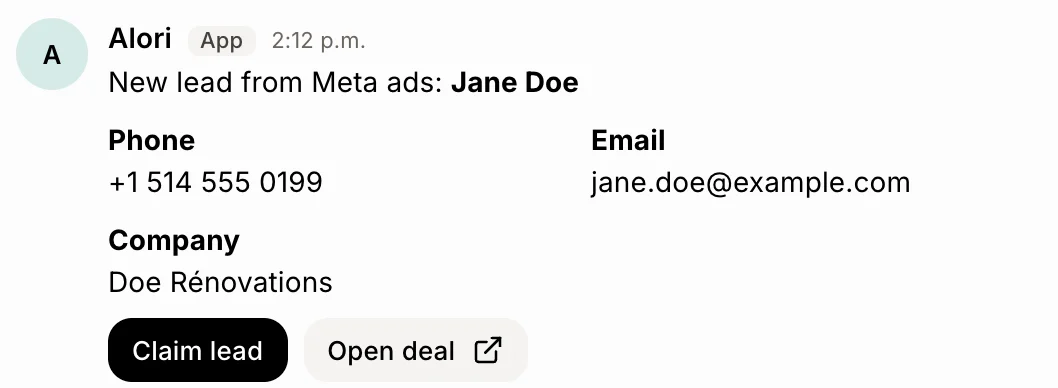
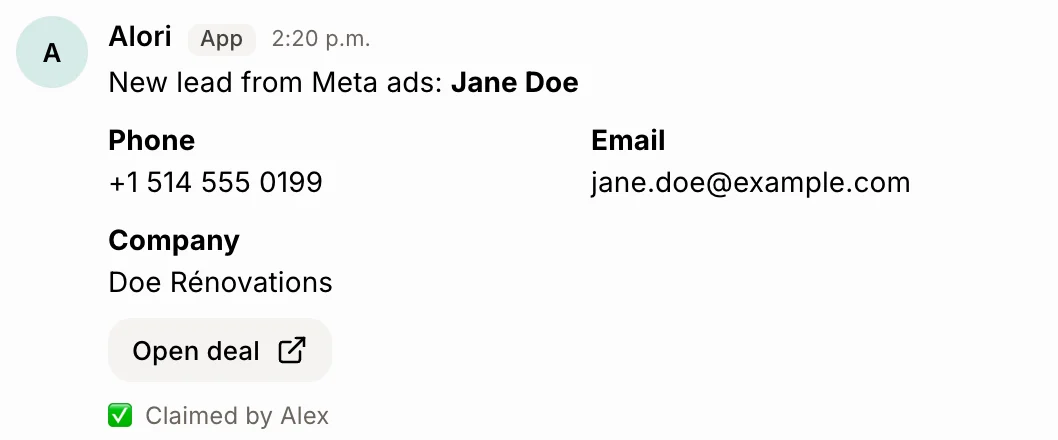
A new lead lands in #leads with a Claim button. The first person to press it gets the lead, and the card says so for everyone.
1. Post the card
curl -X POST https://api.alori.dev/v1/chat/messages \
  -H "Authorization: Bearer YOUR_KEY" \
  -H "Content-Type: application/json" \
  -d '{
    "channel": "leads",
    "text": "New lead: Jane Doe, Doe Rénovations",
    "interaction_url": "https://example.com/alori/clicks",
    "blocks": [
      {
        "type": "section",
        "text": {
          "type": "mrkdwn",
          "text": "New lead from Meta ads: *Jane Doe*"
        }
      },
      {
        "type": "section",
        "fields": [
          {
            "type": "mrkdwn",
            "text": "*Phone*\n+1 514 555 0199"
          },
          {
            "type": "mrkdwn",
            "text": "*Email*\njane.doe@example.com"
          },
          {
            "type": "mrkdwn",
            "text": "*Company*\nDoe Rénovations"
          }
        ]
      },
      {
        "type": "actions",
        "block_id": "lead",
        "elements": [
          {
            "type": "button",
            "action_id": "claim",
            "text": {
              "type": "plain_text",
              "text": "Claim lead"
            },
            "style": "primary",
            "value": "lead_8812"
          },
          {
            "type": "button",
            "action_id": "open",
            "text": {
              "type": "plain_text",
              "text": "Open deal"
            },
            "url": "https://example.com/leads/8812"
          }
        ]
      }
    ]
  }'
Alori answers with the message's id and its channel's id.
{
  "ok": true,
  "messageId": "m12ghi7k3p",
  "channelId": "j97def4a21"
}
2. Your interaction_url receives the click
A POST with one form field, payload, holding this JSON (Slack's block_actions). actions[0].value is the value you gave the button. Answer with a 2xx within 3 seconds.
{
  "type": "block_actions",
  "user": {
    "id": "k57abc2m9q",
    "name": "Alex Martin",
    "username": "Alex Martin",
    "email": "alex@example.com"
  },
  "channel": {
    "id": "j97def4a21",
    "name": "leads"
  },
  "container": {
    "type": "message",
    "message_ts": "m12ghi7k3p",
    "channel_id": "j97def4a21",
    "is_ephemeral": false
  },
  "message": {
    "ts": "m12ghi7k3p",
    "text": "New lead: Jane Doe, Doe Rénovations",
    "blocks": [
      "…"
    ]
  },
  "actions": [
    {
      "type": "button",
      "action_id": "claim",
      "block_id": "lead",
      "value": "lead_8812",
      "action_ts": "1792580000.123"
    }
  ],
  "state": {
    "values": {
      "lead": {
        "claim": {
          "type": "button",
          "value": "lead_8812"
        }
      }
    }
  },
  "response_url": "https://api.alori.dev/v1/chat/responses/<appId>/<one-time token>",
  "trigger_id": "8f2c0e…"
}
3. Answer to mark it claimed
Send this as the 2xx body, or POST it to response_url. replace_original changes the card for everyone in the channel.
{
  "replace_original": true,
  "text": "Jane Doe was claimed by Alex Martin",
  "blocks": [
    {
      "type": "section",
      "text": {
        "type": "mrkdwn",
        "text": "New lead from Meta ads: *Jane Doe*"
      }
    },
    {
      "type": "context",
      "elements": [
        {
          "type": "mrkdwn",
          "text": "✅ Claimed by Alex Martin"
        }
      ]
    }
  ]
}
Check the signature
Every click and form sent to interaction_url carries X-Alori-Request-Timestamp (Unix seconds) and X-Alori-Signature: v0=<hex>, the HMAC-SHA256 of v0:<timestamp>:<raw body>. The key depends on how the message was posted: the SHA-256 hex of your API key for the endpoint, the token at the end of the link for a channel's link. Refuse anything older than 5 minutes.
# Headers: X-Alori-Signature: v0=5f0c…   X-Alori-Request-Timestamp: 1792580000
# Posted with the API: the key is the SHA-256 hex of your API key.
SIGNING_KEY=$(printf %s "$ALORI_API_KEY" | openssl dgst -sha256 | sed "s/^.* //")
# Posted with a channel's link: the key is the token at the end of the link.
# SIGNING_KEY="$ALORI_CHAT_TOKEN"
printf 'v0:%s:%s' "$TS" "$BODY" | openssl dgst -sha256 -hmac "$SIGNING_KEY"
The same card through a channel's link
The link also takes Slack and Discord webhook payloads as they are, and answers { ok, ts }, where ts is the message's id. These calls work on the link's own messages:
curl -X POST "https://api.alori.dev/v1/chat/hooks/<appId>/<token>" \
  -H "Content-Type: application/json" \
  -d '{
    "text": "New lead: Jane Doe, Doe Rénovations",
    "interaction_url": "https://example.com/alori/clicks",
    "blocks": [
      {
        "type": "section",
        "text": {
          "type": "mrkdwn",
          "text": "New lead from Meta ads: *Jane Doe*"
        }
      },
      {
        "type": "section",
        "fields": [
          {
            "type": "mrkdwn",
            "text": "*Phone*\n+1 514 555 0199"
          },
          {
            "type": "mrkdwn",
            "text": "*Email*\njane.doe@example.com"
          },
          {
            "type": "mrkdwn",
            "text": "*Company*\nDoe Rénovations"
          }
        ]
      },
      {
        "type": "actions",
        "block_id": "lead",
        "elements": [
          {
            "type": "button",
            "action_id": "claim",
            "text": {
              "type": "plain_text",
              "text": "Claim lead"
            },
            "style": "primary",
            "value": "lead_8812"
          },
          {
            "type": "button",
            "action_id": "open",
            "text": {
              "type": "plain_text",
              "text": "Open deal"
            },
            "url": "https://example.com/leads/8812"
          }
        ]
      }
    ]
  }'
Calls on the link
POST https://api.alori.dev/v1/chat/hooks/<appId>/<token>/update     { "ts": "m12ghi7k3p", "text": "…", "blocks": [ … ] }
POST https://api.alori.dev/v1/chat/hooks/<appId>/<token>/delete     { "ts": "m12ghi7k3p" }
POST https://api.alori.dev/v1/chat/hooks/<appId>/<token>/ephemeral  { "user": "alex@example.com", "text": "Only you see this" }
POST https://api.alori.dev/v1/chat/hooks/<appId>/<token>/views.open { "trigger_id": "8f2c0e…", "view": { … } }
Blocks and controls
What Team chat draws. Anything else in blocks is left out, and Slack's limits apply.
| Block or control | What it does |
|---|---|
section | Text in Slack's mrkdwn, up to 10 fields side by side, and one control or image on the right (accessory). |
actions | A row of up to 25 controls. |
context | Small grey text and images. |
header, divider, image | A title, a line, a picture. |
button | style primary or danger, and an optional confirm dialog. A button with only a url opens that page and sends no click. |
static_select, multi_static_select, overflow | A menu of your options, one with several picks, or the … menu. |
users_select, channels_select, conversations_select | Pick teammates or a channel. The click gives their Alori ids. |
datepicker, timepicker | A date as YYYY-MM-DD, a time as HH:MM. |
checkboxes, radio_buttons | Up to 10 choices. |
Answer later with response_url
Each click comes with a response_url. POST it the same answers as the 2xx body, for 30 minutes and up to 5 times: replace_original, delete_original, or a new message with text and blocks.
curl -X POST "https://api.alori.dev/v1/chat/responses/<appId>/<one-time token>" \
  -H "Content-Type: application/json" \
  -d '{
    "text": "Someone claimed this lead a moment before you.",
    "response_type": "ephemeral"
  }'
Private messages
A new message in an answer goes only to the person who clicked, unless response_type is in_channel; thread_ts puts it in a thread. A channel's link can also send a private message at any time with /ephemeral. Private messages disappear after 24 hours.
Update or delete
With the endpoint, change or remove a message in a click's answer, with replace_original or delete_original. With a channel's link, /update and /delete work on the link's own messages at any time. Teammates can't edit an app's message.
Forms
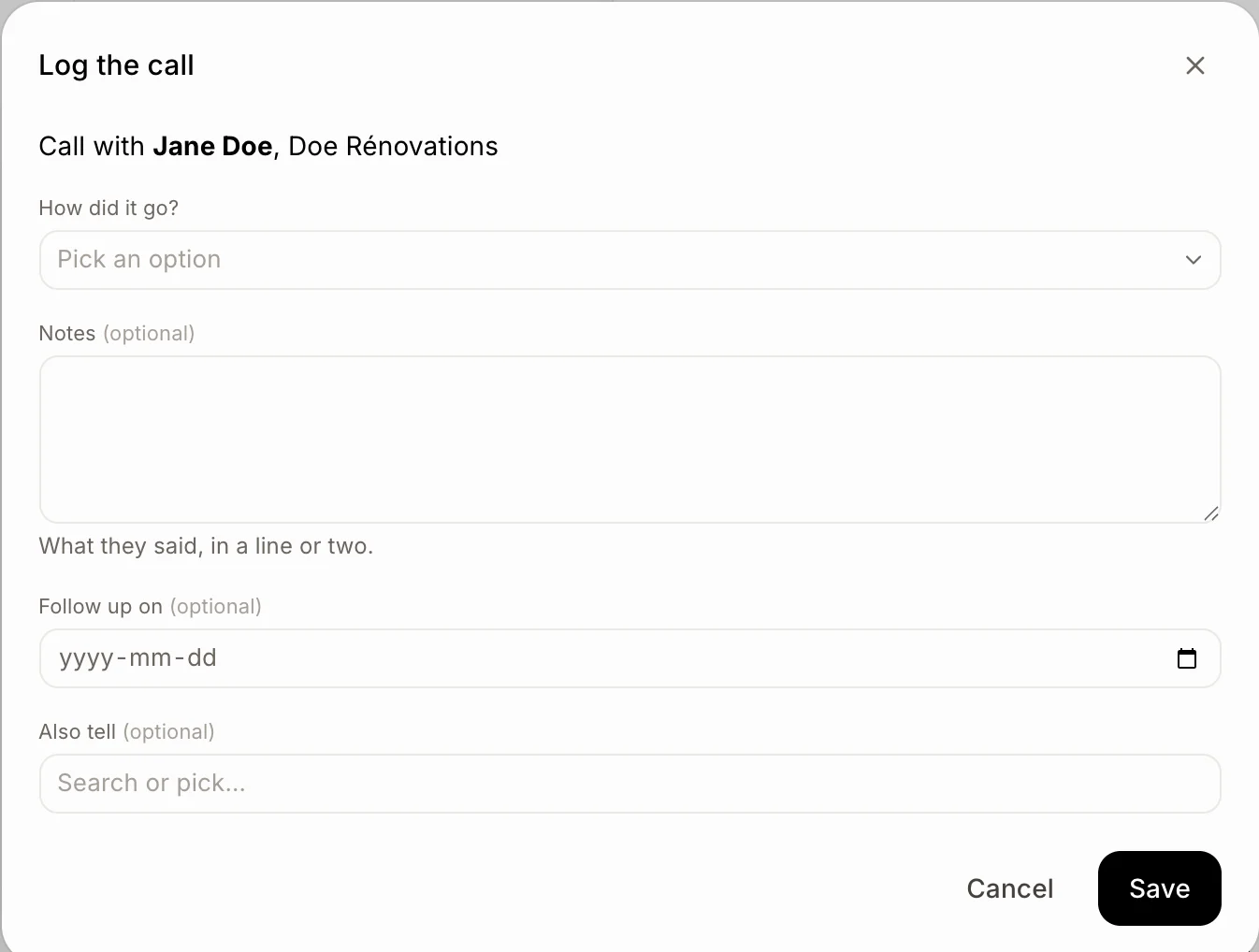
A channel's link can open a form for the person who clicked: POST /views.open with the click's trigger_id, within 3 seconds, and a modal view. When they press Save, interaction_url receives a view_submission with what they entered, signed like a click. Answer with response_action: errors keeps the form open with a line under each field you name, update replaces it, and clear or an empty 2xx closes it.
Open a form
{
  "trigger_id": "8f2c0e…",
  "view": {
    "type": "modal",
    "callback_id": "lost_reason",
    "title": {
      "type": "plain_text",
      "text": "Why was it lost?"
    },
    "submit": {
      "type": "plain_text",
      "text": "Save"
    },
    "blocks": [
      {
        "type": "input",
        "block_id": "reason",
        "label": {
          "type": "plain_text",
          "text": "Reason"
        },
        "element": {
          "type": "static_select",
          "action_id": "pick",
          "options": [
            {
              "text": {
                "type": "plain_text",
                "text": "Price"
              },
              "value": "price"
            },
            {
              "text": {
                "type": "plain_text",
                "text": "Timing"
              },
              "value": "timing"
            }
          ]
        }
      },
      {
        "type": "input",
        "block_id": "note",
        "optional": true,
        "label": {
          "type": "plain_text",
          "text": "Note"
        },
        "element": {
          "type": "plain_text_input",
          "action_id": "text",
          "multiline": true
        }
      }
    ]
  }
}
What interaction_url receives
{
  "type": "view_submission",
  "user": {
    "id": "k57abc2m9q",
    "name": "Alex Martin"
  },
  "view": {
    "id": "v41xyz…",
    "callback_id": "lost_reason",
    "state": {
      "values": {
        "reason": {
          "pick": {
            "type": "static_select",
            "selected_option": {
              "value": "price"
            }
          }
        },
        "note": {
          "text": {
            "type": "plain_text_input",
            "value": "Went with a cheaper quote"
          }
        }
      }
    }
  }
}
Show an error under a field
{
  "response_action": "errors",
  "errors": {
    "note": "Tell us which competitor, please."
  }
}
Limits
- 50 blocks a message, and 200 KB of blocks through the endpoint.
interaction_url: https, at most 2,000 characters.- Answer a click within 3 seconds. A
response_urlworks for 30 minutes and 5 answers, atrigger_idonce, within 3 seconds. - A channel's link posts up to 60 messages a minute. The endpoint counts against your key's 120 requests a minute.
action_ids starting withalori.belong to Alori's own buttons, such as Claim lead on new leads, and are refused.